


Table of Contents
Assess Your Team’s Needs
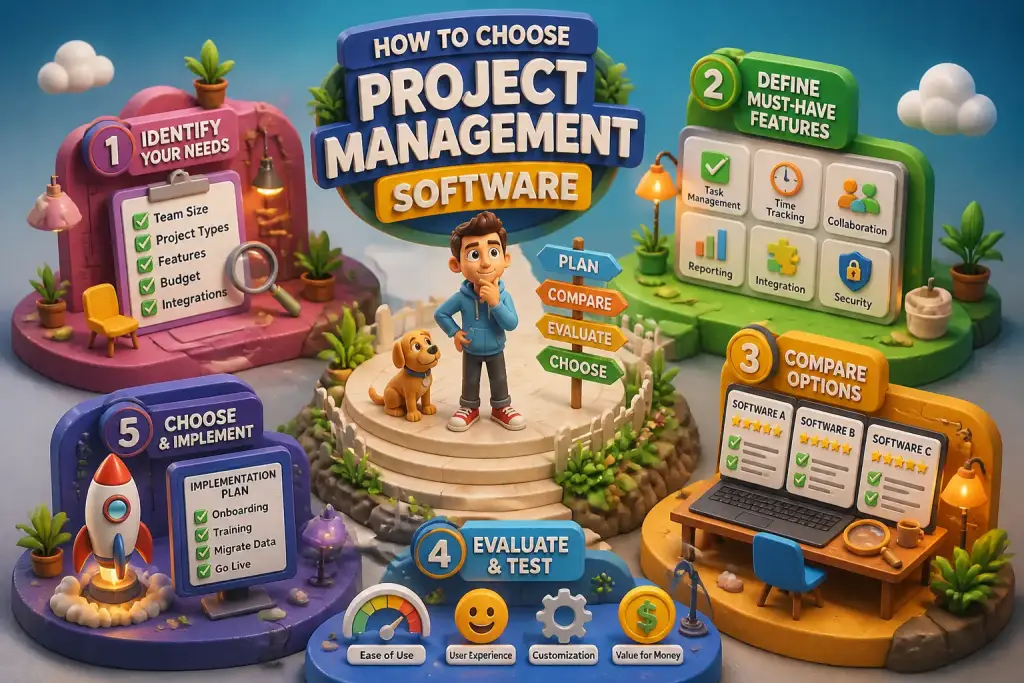
Before selecting project management software, understanding your team’s specific requirements is important. Every team has different workflows, goals, and project types. Take time to assess what features will be most beneficial. Consider how your team collaborates, communicates, and tracks progress. Do they need tools for document sharing, task assignments, or time tracking?
- Identify user needs and software features before making a decision.
- Consider integration capabilities with existing tools for better efficiency.
- Evaluate pricing options to find a solution that fits within your budget.
Engage with team members to gather their insights. Hold a brainstorming session or distribute a survey to gather opinions. This input can help you identify the essential features your software must have. For example, if your team works in different locations, a cloud-based solution may be necessary for easy access.
Evaluate the size of your team. Larger teams may require more advanced features, such as progress tracking or reporting tools. Smaller teams might benefit from simpler, user-friendly options. Understanding these needs will help you narrow down your choices effectively.
Define Key Features
Once you have a clear picture of your team’s needs, the next step is to define what features you need from your project management software. Common features include task management, time tracking, reporting, and collaboration tools.
Task management helps teams assign and prioritize work. Look for software that allows you to create, assign, and track tasks easily. Time tracking is essential for measuring productivity and ensuring deadlines are met. Reporting features can provide insights into project progress and resource allocation.
Collaboration tools, such as chat functions and document sharing, can enhance communication among team members. Be sure to prioritize features that align with your team’s workflows. Some teams may need advanced reporting, while others might focus on simple task management. List these features before starting your search.
Consider User Experience
The user experience (UX) of project management software is vital for ensuring team buy-in and engagement. If the software is hard to use, team members may resist using it. Thus, look for intuitive interfaces and easy navigation.
Try demo versions or free trials to assess user experience. During trials, observe how your team interacts with the software. Gather feedback on its usability. Ask questions like, “Is it easy to find tasks?” or “Can they quickly generate reports?” This feedback is invaluable for making the right choice.
Also, consider the learning curve. Some software may require extensive training, while others are simple enough for immediate use. Prioritize options that offer robust support and training resources to aid your team as they adapt to the new system.
When evaluating software, focus on user reviews and trial versions to determine which features best meet your team's specific needs.
Evaluate Integration Capabilities
Integration with existing tools can significantly enhance the performance of project management software. Many teams rely on various applications for email, file sharing, and communication. Choosing software that easily integrates with these tools can streamline operations and reduce friction.
For example, if your team uses Google Workspace, ensure the software can integrate with Google Drive and Google Calendar. This integration can help in linking tasks with deadlines and sharing documents smoothly. Check for compatibility with tools your team already uses, such as Slack, Trello, or Microsoft Teams.
Integration capabilities can save time and increase productivity. Review the software’s documentation to understand what integrations are available. Also, consider how easy it is to set up these integrations. A complicated setup process may hinder your team’s efficiency.
Review Pricing Models
Pricing is a significant factor when selecting project management software. Different vendors offer various pricing models, including subscriptions, one-time payments, or tiered pricing based on features. Understanding your budget and the total cost of ownership is essential.
Some software charges per user, while others may have flat rates for teams. Carefully consider how many users will need access and what features are necessary. Avoid overspending on unnecessary features. Explore free versions or trials to understand the software better before committing.
Check for hidden fees. Some software may have extra costs for additional features or integrations. Reading the fine print is vital to avoid surprises later. Comparing prices and features across different platforms will help you make an informed decision.
Focus on Security
In today’s digital age, security is a critical concern. When selecting project management software, consider the security measures in place to protect your data. Look for software that encrypts data and provides secure access controls.
Ask questions about how the software handles data breaches and what protocols are in place to prevent them. Also, review their backup procedures to ensure your information is safe. Regular backups are essential for protecting against data loss.
Check if the software complies with relevant regulations, such as GDPR or HIPAA, depending on your industry. Compliance can help safeguard sensitive information and ensure your data is handled responsibly.
Examine Customer Support
Reliable customer support can greatly enhance your experience with project management software. When issues arise, quick access to support can minimize disruptions. Research the vendor’s support options, including availability and response times.
Check if they offer multiple support channels, such as live chat, email, or phone support. Evaluate whether they provide a knowledge base or online resources to help users troubleshoot common issues independently.
Read user reviews to gauge the responsiveness of their support team. Positive feedback regarding customer service can be a good indicator of the vendor’s reliability. A responsive support team can make a significant difference in your overall satisfaction with the software.
Utilize Free Trials
Many software providers offer free trials or demo versions to help potential users evaluate their products. Taking advantage of these trials can provide valuable insights into how the software functions in real-world scenarios.
During the trial, involve your team to gather feedback on usability and functionality. Encourage team members to explore various features and assess whether the software meets their needs. This hands-on experience can highlight any challenges or limitations.
Use this time to assess how well the software integrates with your existing tools. Gather feedback from your team regarding their experience. This collective input can be instrumental in making the final decision.
Consider Scalability
As businesses grow, their project management needs can change. Selecting software that scales with your organization is vital for long-term success. Consider whether the software can accommodate an increasing number of users and projects without sacrificing performance.
Check if the vendor offers different pricing tiers or plans to support growth. Some software may have limitations on features or the number of users in lower-tier plans. Ensuring that the software can adapt to your evolving needs will save you from the hassle of switching platforms later.
Evaluate user capacity and storage limits. If your team plans to grow rapidly, choose software that can handle an influx of new users and projects efficiently. Scalability ensures your investment remains valuable as your business expands.
Gather Feedback and Make a Decision
After evaluating various options and gathering input from your team, it is time to make a decision. Compile all the information you have gathered, including user feedback, feature comparisons, and pricing details. This organized approach will help clarify which software is the best fit for your team.
Involve key stakeholders in the decision-making process. Ensure that the final choice aligns with your team’s needs and organizational goals. Discuss the pros and cons of each option before reaching a consensus.
Once a decision is made, communicate it clearly to your team. Provide training and resources to help them transition smoothly to the new software. A well-informed team is more likely to embrace the change and use the software effectively.
Long-Term Maintenance Tips
Choosing project management software is just the beginning. To ensure ongoing success, regular maintenance and updates are essential. Consider creating a schedule to review software performance, user satisfaction, and feature usage periodically.
Encourage team members to share feedback on their experiences. This ongoing dialogue can help identify areas for improvement and ensure the software continues to meet your needs. Stay informed about new features or updates from the vendor to take full advantage of the software.
Finally, consider training opportunities for your team. Regular training can help users become more proficient and discover new features that can enhance their work. Keeping your team up to date will maximize the software’s potential and improve overall productivity.


