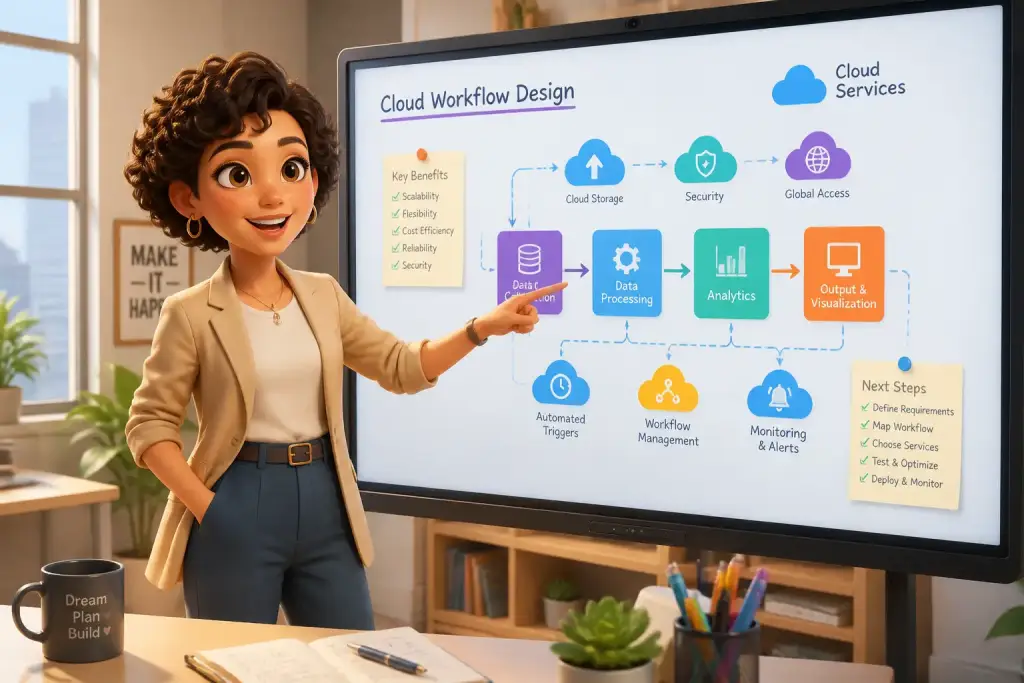










Effective collaboration is essential for any successful organization. Today, teams rely on digital tools to streamline their workflows, enhance communication, and boost productivity. These tools help break down barriers that can hinder collaboration, making it easier for team members to work together, no matter where they are located. In this comprehensive guide, we will explore various digital tools and techniques that can help improve collaboration within your organization.
- Digital tools enhance team communication and efficiency.
- Project management software organizes tasks and priorities.
- Collaboration platforms centralize resources and documents.
Choosing the Right Digital Tools
Selecting the appropriate digital tools for your team is the first step toward better collaboration. The right tools can improve communication, project management, and file sharing. However, with so many options available, it can be challenging to determine which tools are best suited for your specific needs.
Begin by identifying your team’s unique requirements. Consider factors such as team size, project complexity, and existing workflows. For example, teams with remote members may need tools that emphasize communication and video conferencing. On the other hand, teams working on complex projects might benefit from robust project management software. Additionally, involving team members in the selection process can ensure everyone feels invested in the tools chosen.
After identifying your needs, research available tools. Look for user reviews and case studies to understand how each tool has helped other teams. Some popular tools include Slack for communication, Trello for project management, and Google Drive for file sharing. Each tool offers unique features designed to enhance collaboration.
Your goal is to create a streamlined experience that fosters collaboration. Test a few tools with your team before fully committing to any single option. This trial period allows you to assess each tool’s effectiveness and gather feedback from team members. By taking the time to choose the right digital tools, your organization will be better equipped to achieve its goals.
Enhancing Communication with Digital Platforms
Effective communication is the foundation of successful collaboration. Digital platforms that facilitate communication can significantly enhance team interactions. Tools like Slack, Microsoft Teams, and Zoom allow team members to communicate in real time, share information, and hold virtual meetings.
Using a dedicated communication platform can help reduce email overload. Instead of sifting through countless emails, team members can quickly find information in instant messages or channels. For instance, Slack offers channels for specific projects or topics, enabling teams to stay organized and focused on relevant discussions.
Implementing Video Conferencing
Video conferencing is another essential aspect of modern communication. Tools like Zoom and Google Meet provide face-to-face interaction, which can help build stronger relationships among team members. Video calls are especially important for remote teams, as they allow for non-verbal cues that can enhance understanding.
- Schedule regular check-ins to keep the team aligned on goals and tasks.
- Use video calls for brainstorming sessions to facilitate more interactive discussions.
- Record meetings for team members who cannot attend, ensuring everyone stays informed.
Encouraging the use of video conferencing can lead to more engaged conversations and improved teamwork. Make sure team members feel comfortable using these tools by providing training sessions or resources on best practices.
Streamlining Project Management
Project management software plays a significant role in streamlining collaboration. These tools enable teams to organize tasks, set deadlines, and track progress all in one place. Popular options include Asana, Monday.com, and Trello. Each tool offers unique features that can help teams manage their projects more effectively.
Using project management software allows teams to visualize their work and identify bottlenecks. For example, Kanban boards in Trello let teams move tasks through different stages, making it easy to see what needs attention. This visual representation helps maintain accountability and ensures everyone knows their responsibilities.
Creating Clear Task Assignments
One of the most critical aspects of project management is assigning tasks clearly and effectively. When team members understand their roles, they can work more efficiently. Consider these steps for creating clear task assignments:
- Define project goals and objectives to provide context for each task.
- Break down larger tasks into smaller, manageable steps.
- Assign tasks to specific team members, ensuring they understand what is expected.
- Set deadlines and check-in points to monitor progress and provide support.
By following these steps, your team can work more collaboratively and efficiently. Project management software also allows for easy updates, so team members can adjust their tasks as needed based on project developments.
Centralizing Resources and Documents
Centralized storage for documents and resources is vital for effective collaboration. Cloud storage solutions like Google Drive and Dropbox allow team members to access files from anywhere, ensuring everyone has the necessary information at their fingertips.
Using a centralized location for documents reduces confusion and helps maintain version control. Teams can avoid the hassle of searching through countless email attachments or outdated files. Each team member can access the most current documents, which streamlines the decision-making process.
Establishing a Clear Folder Structure
A well-organized folder structure is essential for maximizing the effectiveness of your centralized storage. Consider these tips for establishing a clear folder structure:
- Create main folders for each project or department, ensuring easy navigation.
- Use subfolders to categorize files by type, such as reports, presentations, or meeting notes.
- Regularly review and update the folder structure to accommodate new projects or changes in team needs.
By implementing a clear folder structure, your team can quickly find the resources they need, leading to better collaboration and productivity.
Integrating Collaboration Tools with Existing Systems
Integrating collaboration tools with existing systems can significantly enhance their effectiveness. Many organizations use various software and platforms, making it essential to ensure these tools work together harmoniously. Integration can streamline workflows and reduce the need for manual data entry.
For instance, integrating project management software with communication tools can help teams stay updated on project developments. When a task is updated in Asana, team members can receive real-time notifications in Slack. This connection keeps everyone informed and engaged in the project.
Identifying Integration Opportunities
To successfully integrate tools, it’s important to identify key opportunities. Start by assessing which tools your team frequently uses and explore their integration capabilities. Consider these steps:
- List all current tools used by your team.
- Research available integrations for each tool.
- Prioritize integrations that can streamline processes and improve communication.
- Test integrations before full implementation to ensure they meet your team’s needs.
By integrating collaboration tools with existing systems, you can create a more efficient workflow that enhances teamwork and productivity.
Regularly update your digital tools to ensure all team members have access to the latest features and security improvements.
Measuring the Impact of Digital Tools
Measuring the impact of digital tools on collaboration is essential for continuous improvement. Understanding how these tools affect team performance can help organizations make informed decisions about future investments. Establish key performance indicators (KPIs) to track progress and evaluate the effectiveness of digital tools.
Consider metrics such as project completion rates, team engagement levels, and communication efficiency. By analyzing these metrics, teams can identify areas for improvement and make necessary adjustments. For example, if communication efficiency decreases after implementing a new tool, it may be necessary to provide additional training or consider alternative options.
Conducting Regular Assessments
Regular assessments of digital tools can help ensure they continue to meet your team’s needs. Consider these steps when conducting assessments:
- Gather feedback from team members on their experiences with the tools.
- Analyze KPIs to identify trends and areas for improvement.
- Make adjustments to tools, processes, or training as needed based on findings.
By regularly measuring the impact of digital tools, your organization can stay aligned with its collaboration goals and continuously enhance teamwork.
Innovating Collaboration Beyond Tools
While digital tools play a significant role in enhancing collaboration, organizations should also focus on cultivating a collaborative culture. Encouraging open communication, trust, and teamwork can lead to more successful collaboration efforts.
Consider implementing team-building activities to strengthen relationships among team members. These activities can range from casual get-togethers to structured workshops that emphasize collaboration skills. Fostering a culture that values collaboration can help teams feel more connected and engaged, ultimately leading to better results.
Encouraging a Collaborative Mindset
To further enhance collaboration, organizations should encourage a collaborative mindset among team members. Here are some strategies to promote this mindset:
- Recognize and reward collaborative efforts to reinforce the importance of teamwork.
- Encourage team members to share their ideas and opinions freely.
- Provide training on effective communication and collaboration techniques.
By creating an environment that values collaboration, organizations can maximize the benefits of digital tools and foster stronger team dynamics.

Federica Ferrari
Founder & Lead EditorFederica Ferrari is the founder and lead editor of Business Braintech, based in Italy. She provides readers with practical guidance on emerging technologies for business transformation.